
Interactive Birth Chart Software: Learn Astrology Visually for Free
This interactive birth chart software helps you explore and understand your ZodiacRoots natal wheel visually. Upload your Classic Chart SVG and learn astrology step by step by clicking planets, signs, houses and aspect lines directly inside your own chart.
Why This Interactive Birth Chart Software Feels Different
Most astrology websites generate a chart and leave beginners alone with symbols they do not understand. This interactive birth chart software was designed differently: instead of only showing a static natal wheel, it helps you explore it visually, step by step, directly inside your own ZodiacRoots chart.
Unlike traditional birth chart software that simply calculates placements, this page works as a free astrology learning tool. You can click planets, zodiac signs, houses and aspect lines to understand what each symbol represents in astrology.
Many users use this interactive birth chart guide to learn how to read a natal chart, understand astrological aspect analysis, practise birth chart interpretation and share charts with astrology communities.
How to Read a Birth Chart Wheel Step by Step
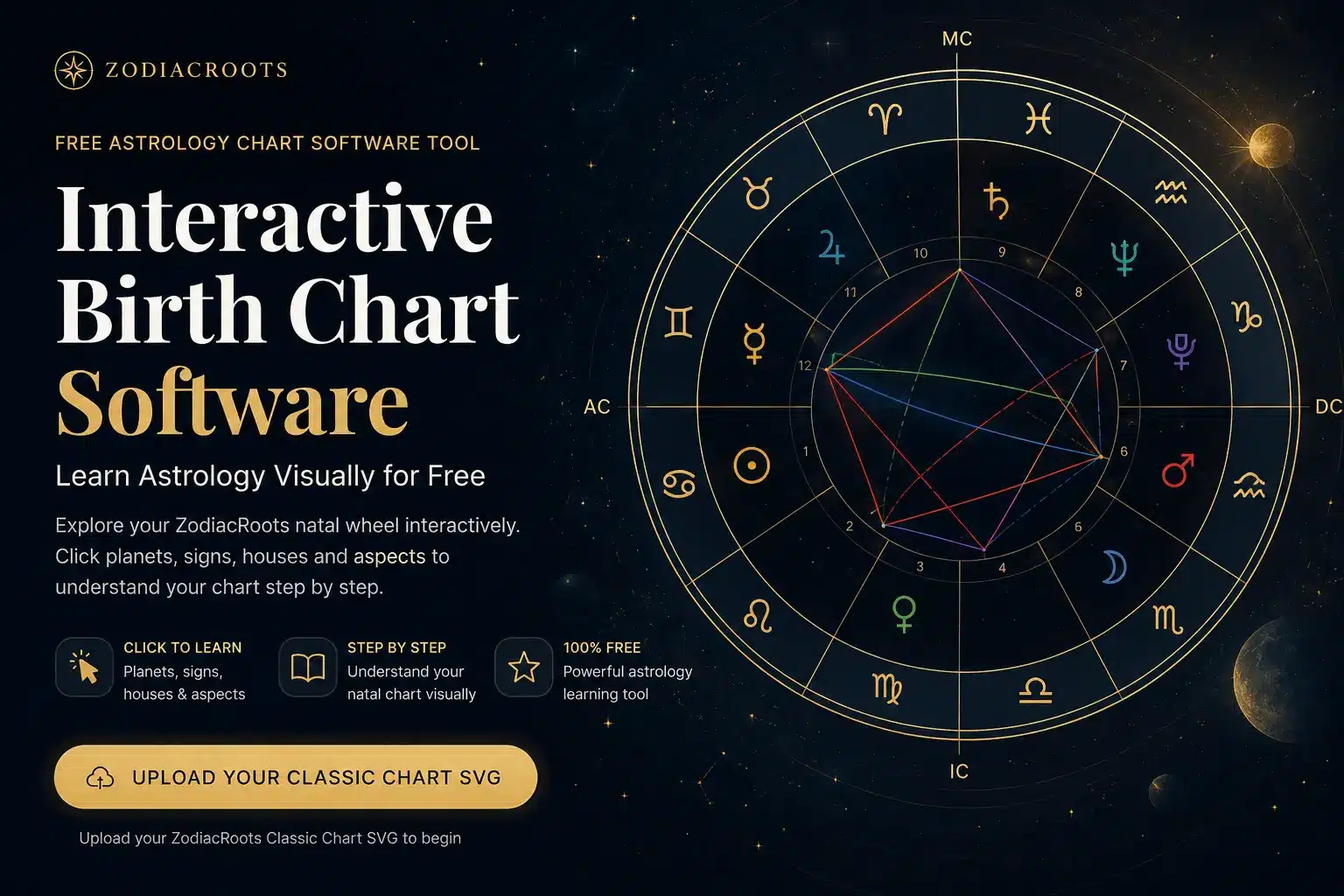
Before using the interactive birth chart software, it helps to understand the visual map. A birth chart wheel is a layered diagram: the outer ring shows the zodiac signs, the inner divisions show houses, the planet glyphs show placements, and the coloured lines show aspects between planets.
Outer Ring: Zodiac Signs
The outer ring shows the 12 zodiac signs. In astrology, each sign occupies a 30-degree symbolic sector of the zodiac. Signs describe the style or atmosphere through which a planet expresses itself.
Inner Divisions: Houses
The 12 houses divide the chart into life areas: identity, money, learning, home, creativity, work, relationships, transformation, beliefs, career, community and inner life.
Planet Symbols
Planet symbols show what energy is active: Sun for identity, Moon for emotions, Mercury for communication, Venus for attraction, Mars for action, Jupiter for growth and Saturn for structure.
Aspect Lines
The lines inside the wheel connect planets. These are aspects: angular relationships that show how two planetary functions cooperate, challenge each other or require adjustment.
Blue Lines
Blue lines usually represent harmonious aspects such as trines and sextiles. They suggest flow, ease, cooperation or natural talent.
Red Lines
Red lines usually represent tense aspects such as squares and oppositions. They can show pressure, conflict, polarity or growth through effort.
Green or Minor Lines
Green or secondary lines may point to adjustment aspects, subtle imbalance or areas where different parts of the personality need fine-tuning.
planet = what · sign = how · house = where · aspect = relationship
Free Interactive Birth Chart Software Tool
Generate your free chart first using the Free Birth Chart Generator. Download the Classic Chart SVG, then upload it below to explore it with this interactive birth chart software.
Astrological Aspect Analysis with Interactive Birth Chart Software
Advanced Mode helps with astrological aspect analysis by highlighting the lines between planets. The angular relationships between planets are called aspects in astrology, and they are often used to describe flow, tension, polarity or adjustment within the chart.
This makes the page more than a static interactive birth chart guide. It becomes a free birth chart analysis tool for learning how planetary relationships appear visually inside the natal wheel.
For a fuller visual explanation of lines, symbols and the structure of the wheel, read Natal Chart Wheel Explained. For deeper synthesis beyond the wheel, continue with How to Interpret a Birth Chart.
Related Astrology Software and Learning Guides
This page is the practical bridge between generating a chart and learning how to interpret it. Use it together with the ZodiacRoots free birth chart calculator and our guide pages to move from chart generation to real symbolic understanding.
FAQ
Is this free interactive birth chart software?
Yes. This is free interactive birth chart software that helps you explore your ZodiacRoots Classic Chart SVG visually. It is designed for learning astrology, not for replacing a full professional interpretation.
Does this birth chart software calculate my natal chart?
No. The software does not calculate a new natal chart on this page. First generate your chart with the ZodiacRoots Free Birth Chart Generator, download the Classic Chart SVG, and then upload it here for interactive exploration.
What file should I upload?
Upload the original Classic Chart SVG downloaded from the ZodiacRoots Free Birth Chart Generator. This keeps the planets, signs, houses and aspect lines interactive inside the software.
Can I upload a chart from another astrology website?
No. This interactive birth chart software only accepts Classic Chart SVG files created by ZodiacRoots because the interaction depends on the internal structure of those files.
Is this also a birth chart analyzer?
Yes, in an educational sense. It works as a free birth chart analyzer for visual learning by explaining planets, signs, houses and aspects directly on the wheel. It does not make automated life predictions.
Does this replace a full birth chart interpretation?
No. It explains what you are seeing in the wheel. A complete interpretation still needs synthesis across planets, signs, houses, aspects and birth context.